★ ЛУЧ-МАППАРАТУРА СВЯЗИ// MESH RADIO TERMINAL

ЛУЧLUCH · "THE BEAM"

Privet, comrade! I am Misha, cosmonaut first class and mascot of ЛУЧ. Today I explain you this very fine radio terminal.

ЛУЧ talks to your MeshCore LoRa radio over Bluetooth, USB or Wi-Fi, writes every message into the logbook, and looks like the console of a Soyuz. No internet, no phone tower, only radio. As it should be.

github.com/mojeska/luch · MIT licence · Python

ПРИВЕТ, ТОВАРИЩ!
Ctrl+T

American comrade? Press Ctrl+T.

On the control panel all is in Russian, of course. Is our way. But Misha is not monster: press Ctrl+T and every heading, button and slogan becomes English. Yankee mode. Press again for Russian. ЛУЧ remembers your choice, and messages from comrades stay as they wrote them.

The control panelПульт управления

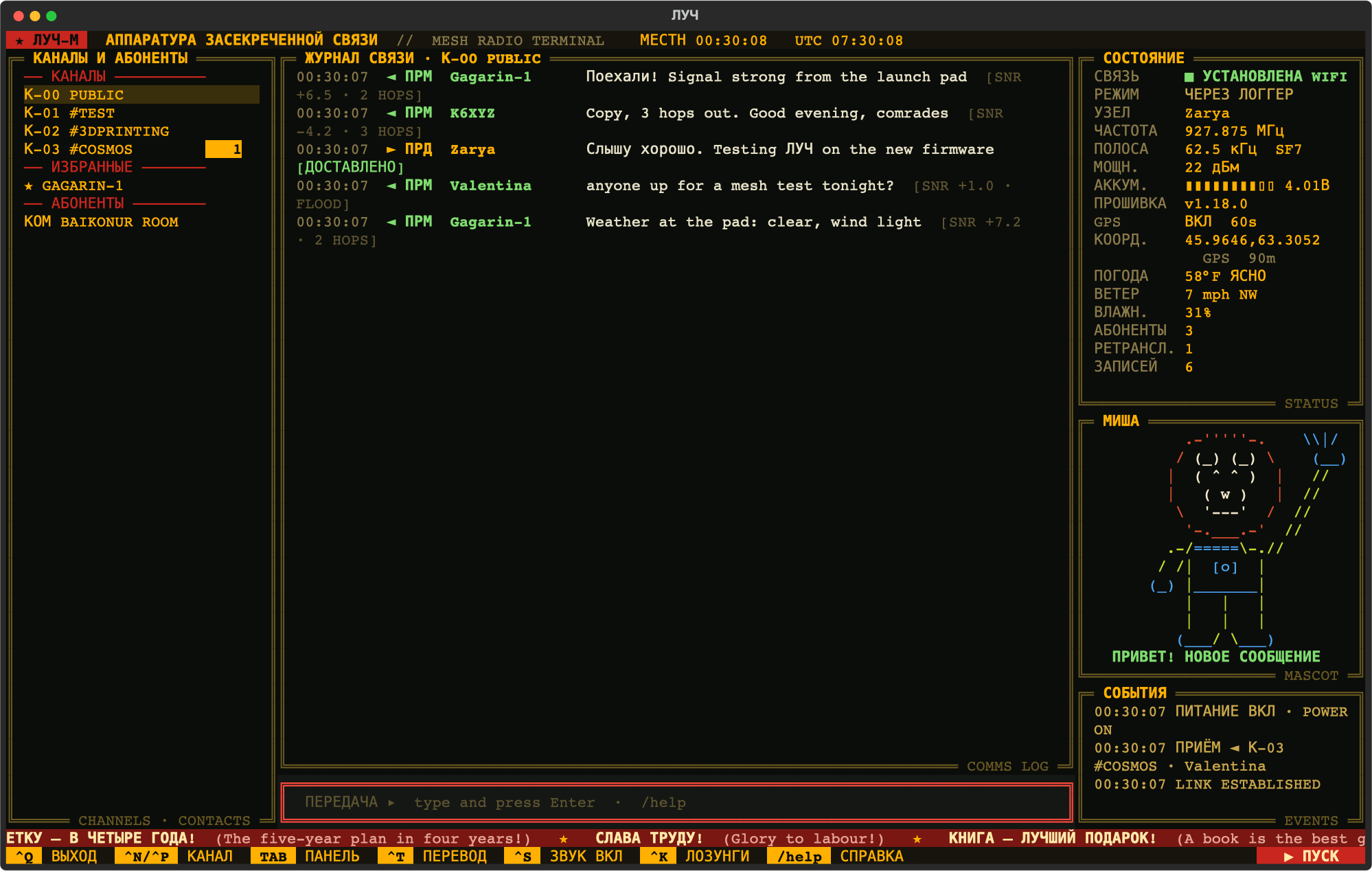
LUCH in Russian: channels on the left, the comms log in the middle, radio status, weather and Misha on the right, slogan ticker at the bottom

Misha: Left side: channels, favourite comrades with ★, and other comrades. Middle: the comms log, with signal strength and how many hops each message travelled. Right side: radio status, GPS position and weather, me, and events. Bottom: slogans, for morale.

What ЛУЧ doesЧто умеет ЛУЧ

СВЯЗЬ

Three ways to the radio

Bluetooth, USB cable, or Wi-Fi on firmware 1.18 boards like the Heltec V3. Wi-Fi is best: background logger holds the radio, your phone keeps Bluetooth.

ЖУРНАЛ

Every message logged

Each radio has its own SQLite logbook. The background logger runs at login (launchd on Mac, systemd on Linux), so nothing is missed while screen is closed. /search finds anything.

КАНАЛЫ

Channels, favourites, tags

/join #name for hashtag channels, private ones with key. /fav sets radio's own favourite flag, so comrade is never pushed out of full contact list. /tag for your own labels.

GPS · ПОГОДА

Position and weather

On radio with GPS, /gps on 60 shows where you are, and current weather from Open-Meteo. No GPS? /home sets a home position.

ПРОШИВКА

Firmware watch

ЛУЧ compares radio firmware with newest MeshCore Companion release, and shows ▲ NEW when update is ready.

ЗВУК

8-bit sound

Chiptune chirps for messages, deliveries, link up and down. Ctrl+S for silence. And the ПУСК button, see below. Very important.
About me, MishaО Мише

Misha: I live in the status column and I have opinions about your radio. My suit is yellow, like a cosmonaut in the old film Red Planet, where a bear like me ran the diagnostic screen. ЛУЧ drew me new, from scratch.

WhenMisha doesMisha says
All is normalStands and blinksВСЁ В НОРМЕ · all nominal
Message arrivesWavesПРИВЕТ! НОВОЕ СООБЩЕНИЕ · hello, new message
Your DM is deliveredPoints to skyДОСТАВЛЕНО! · delivered
Link lostHolds helmetНЕТ СВЯЗИ · no link
Battery lowHolds helmetСЛАБОЕ ЗАЖИГАНИЕ · weak ignition
Anthem playsSalutesСЛАВЬСЯ, ОТЕЧЕСТВО! · glory to the Fatherland

Too much Misha? Ctrl+B hides me. I am not offended. Much.

Radios Misha has flown withПроверенные радиостанции

Misha: Two radios have been to space with ЛУЧ so far. Both run MeshCore Companion firmware, Bluetooth build, and both now wear version 1.18.0.

RadioBluetoothWi-FiUSBGPS
Heltec WiFi LoRa 32 V3✅✅not triednone on board
Seeed Wio Tracker L1 Pro✅none on boardnot tried✅

Other boards with MeshCore Companion firmware should work, because ЛУЧ speaks the same protocol as the MeshCore phone app, but Misha has not flown them yet. USB and Linux with a real radio are also untested. Tried another radio? Tell Misha, and it goes in the table.

InstallУстановка

Misha: You need Python 3.11 or newer and radio with MeshCore Companion firmware. Mac and Linux both work.

git clone https://github.com/mojeska/luch.git && cd luch
python3 -m venv .venv && .venv/bin/pip install -e .

.venv/bin/luch -d MeshCore-MyNode          # Bluetooth
.venv/bin/luch --port auto                 # USB
.venv/bin/luch --tcp 192.168.1.50          # Wi-Fi
.venv/bin/luch service install -d MeshCore-MyNode   # background logger

Arch or Omarchy: sudo pacman -S bluez bluez-utils, pair radio once with --pin (the PIN on its screen), and add yourself to the uucp group for USB. Full details in the README.

Keys and commandsКлавиши и команды

Key / commandWhat it does
Ctrl+TYankee mode: screen text Russian ⇄ English
EnterTransmit on selected channel or contact
/dm nameDirect line to a comrade
/join #name · /leaveJoin or leave a channel
/fav · /tag name tagFavourite on the radio · LUCH-only tag
/gps on 60 · /home lat lon · /weatherPosition and weather
/search wordsSearch the whole logbook
/name · /reboot · /cli · /firmwareRadio housekeeping
Ctrl+N / Ctrl+PNext / previous conversation
Ctrl+S · Ctrl+K · Ctrl+BSound · slogan ticker · Misha, on and off
Ctrl+L or ▶ ПУСКLaunch countdown, then the anthem. Esc aborts
Ctrl+QQuit. Misha says goodbye

The ПУСК buttonКнопка пуска

Misha: In the corner of ЛУЧ there is red button. ПУСК means "launch". You press it, ten seconds countdown, and then the anthem plays in 8-bit, music of Alexandrov from 1939, and I salute. Here you may try it. Is safe. Nothing is launched. Probably.

Sound on, comrade. About one minute. Esc or СТОП to abort.